ADA Title II and Your Website: What Schools and Governments Need to Know Before the Deadline
On April 24, 2024, the Department of Justice published a final rule that, for the first time, sets specific technical standards for state and local government websites and mobile apps under Title II of the Americans with Disabilities Act. If you run a school district, city, county, library, or special district website, this rule applies to you.
This is not a vague recommendation. It is a binding federal regulation with hard deadlines, a specific technical standard (WCAG 2.1 Level AA), and a growing body of enforcement actions behind it. Below is what the law actually says, what enforcement looks like in practice, and what you need to do to comply.
What ADA Title II requires
Title II of the ADA prohibits state and local governments from discriminating against people with disabilities in their programs, services, and activities. Courts and the DOJ have interpreted this to include websites and digital services for over a decade. What changed in 2024 is that the DOJ made it explicit and measurable.
The final rule requires all web content and mobile apps provided by state and local governments to conform to WCAG 2.1 Level AA — a set of 50 success criteria covering things like text alternatives for images, keyboard navigation, color contrast, form labels, and video captions. WCAG 2.1 AA is not new. It has been the recognized accessibility standard since 2018. What is new is that compliance is now a legal obligation with a deadline.
The deadlines
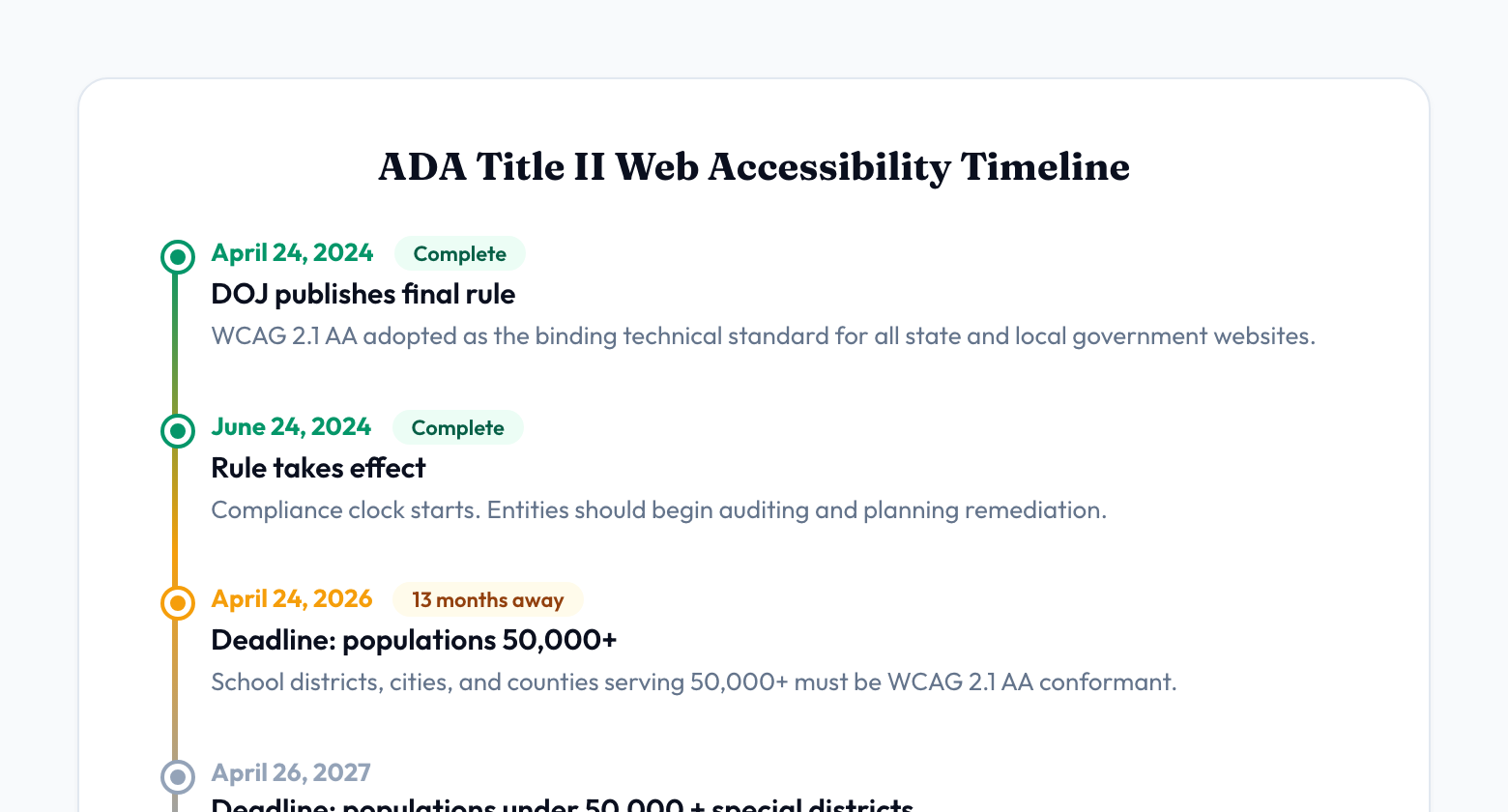
The rule uses a two-phase timeline based on population size:
- April 24, 2026 — Public entities (other than special districts) serving a population of 50,000 or more. This includes most mid-to-large school districts, cities, and counties.
- April 26, 2027 — Public entities serving a population of fewer than 50,000, plus all special district governments (library districts, transit authorities, water districts, etc.) regardless of size.
If your district or municipality falls in the first group, you have until April 2026. That is not a target date — it is a compliance deadline. After that date, a non-conforming website is a federal civil rights violation.
Who this applies to
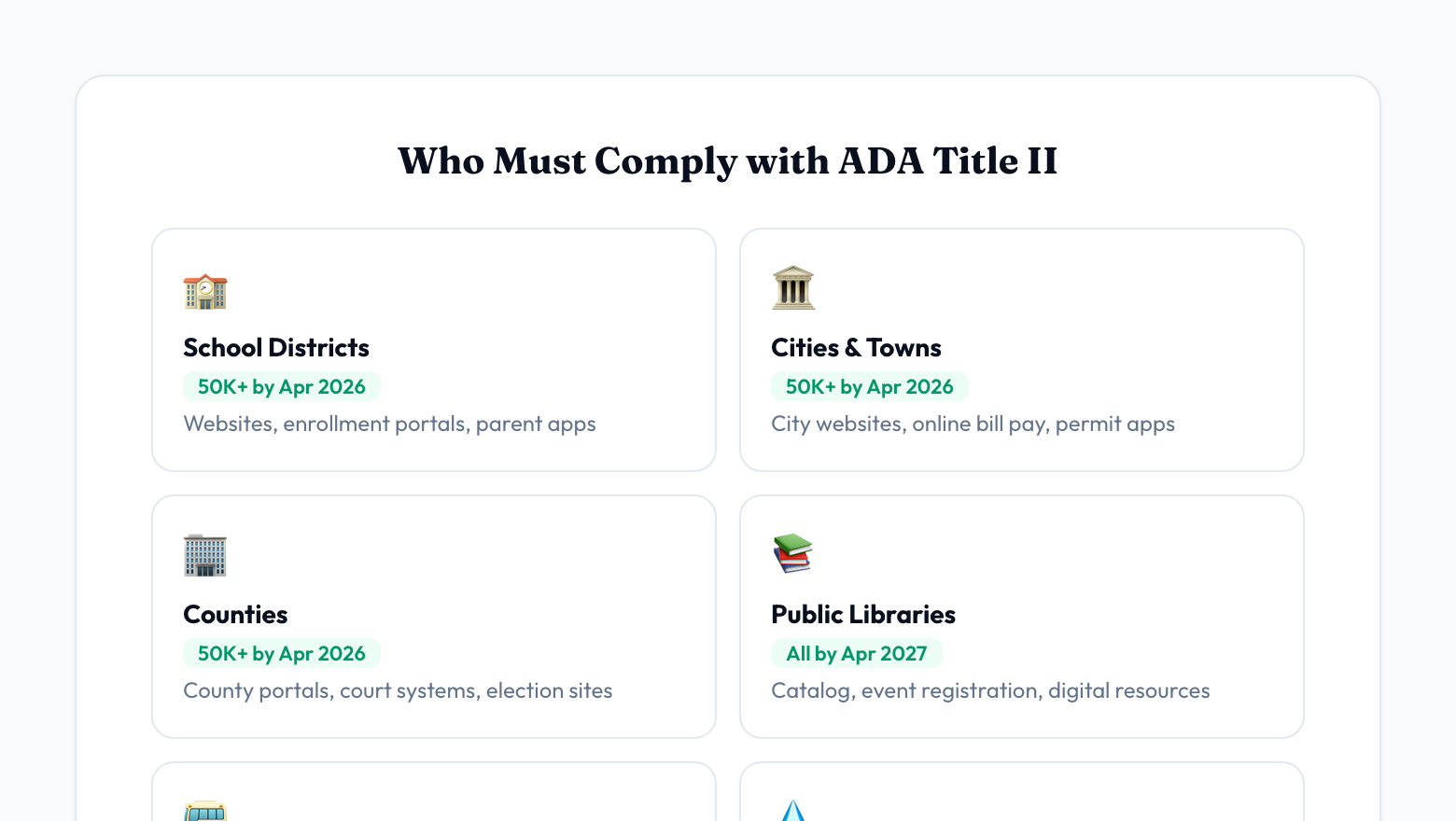
If you receive any federal funding or are a unit of state or local government, Title II covers you. That includes:
- K-12 school districts (public)
- Cities and towns
- Counties
- Public libraries and library districts
- Special districts (water, transit, fire, parks)
- State agencies
- Public universities and community colleges
The rule covers your primary website, subdomains, any web applications you provide to the public (online bill pay, permit applications, school enrollment portals), and mobile apps. Third-party content you embed or link to from your site can also create liability if it is integral to accessing your services.
What enforcement actually looks like
Enforcement comes from three directions: DOJ investigations, Office for Civil Rights (OCR) complaints, and private lawsuits. All three are active and increasing.
DOJ settlement agreements. The DOJ has been enforcing web accessibility for years, and the pace is accelerating. Recent examples:
- In June 2024, the DOJ secured settlement agreements with four Texas counties (Colorado, Runnels, Smith, and Upton) for maintaining inaccessible election websites. The counties agreed to audit and remediate all online election content, hire independent accessibility auditors, designate ADA coordinators, and train staff.
- In January 2024, the DOJ settled with Service Oklahoma over an inaccessible state agency mobile app.
- In June 2024, the DOJ issued formal findings that Alaska violated Title II through inaccessible election websites and polling place information.
OCR complaints against school districts. Between 2016 and 2018, a single disability rights advocate filed roughly 2,400 OCR complaints against K-12 school systems with inaccessible websites. That wave resulted in over 1,000 school districts signing resolution agreements with the federal government. A joint May 2023 Dear Colleague letter from DOJ and OCR confirmed that OCR had resolved and monitored more than 1,000 digital accessibility cases. These resolution agreements typically require the district to audit their website, remediate all issues, adopt an accessibility policy, and submit to ongoing monitoring.
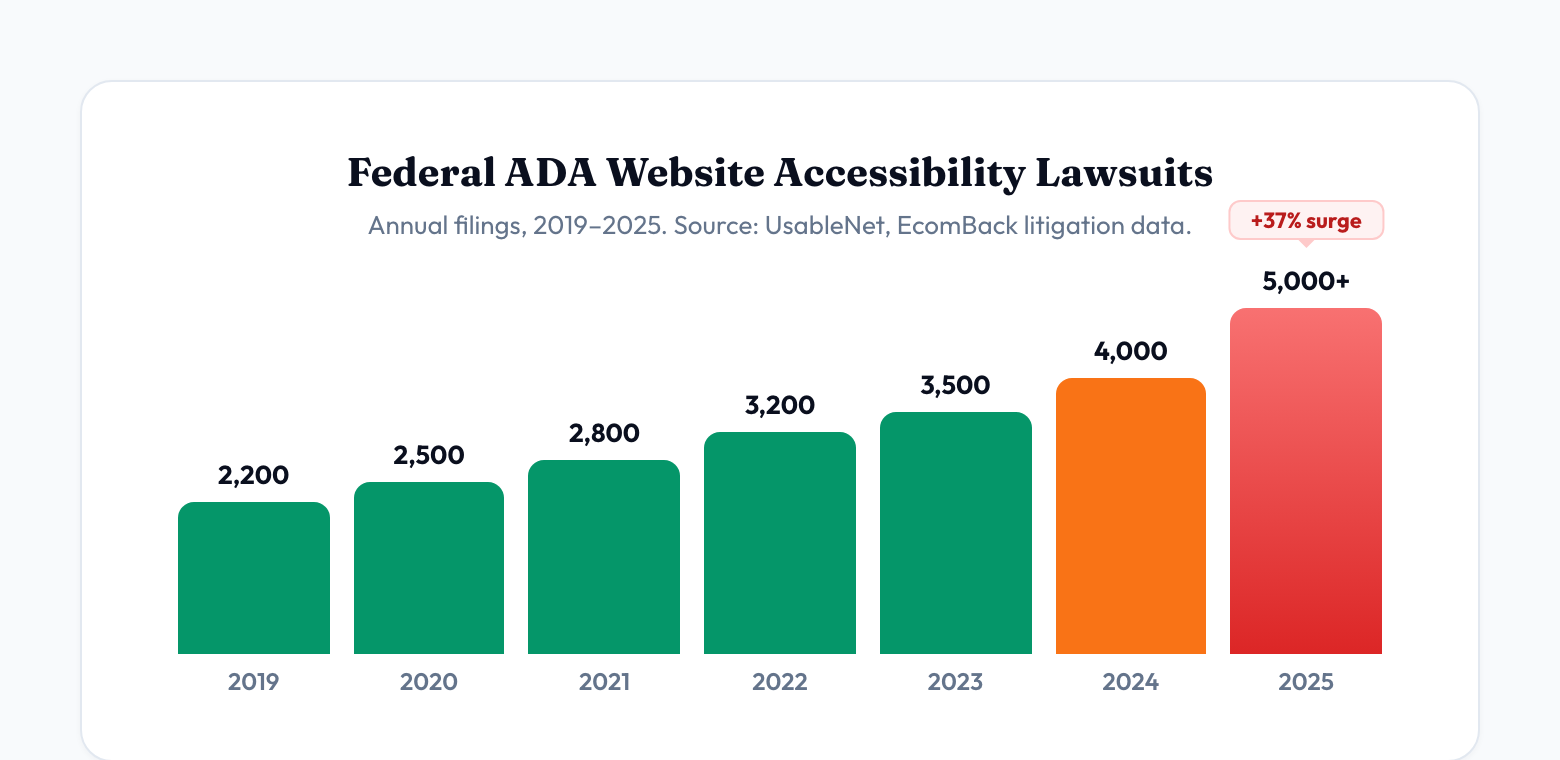
Private lawsuits. ADA website accessibility lawsuits surged 37% in the first half of 2025 alone, with over 5,000 federal cases filed that year. While most target private businesses under Title III, the new Title II rule gives plaintiffs' attorneys clear grounds to sue government entities after the compliance deadlines pass. There is no ambiguity left — the standard is defined, the deadline is published, and non-compliance is straightforward to prove with automated scanning tools.
What settlements cost
The financial exposure depends on how the complaint is resolved:
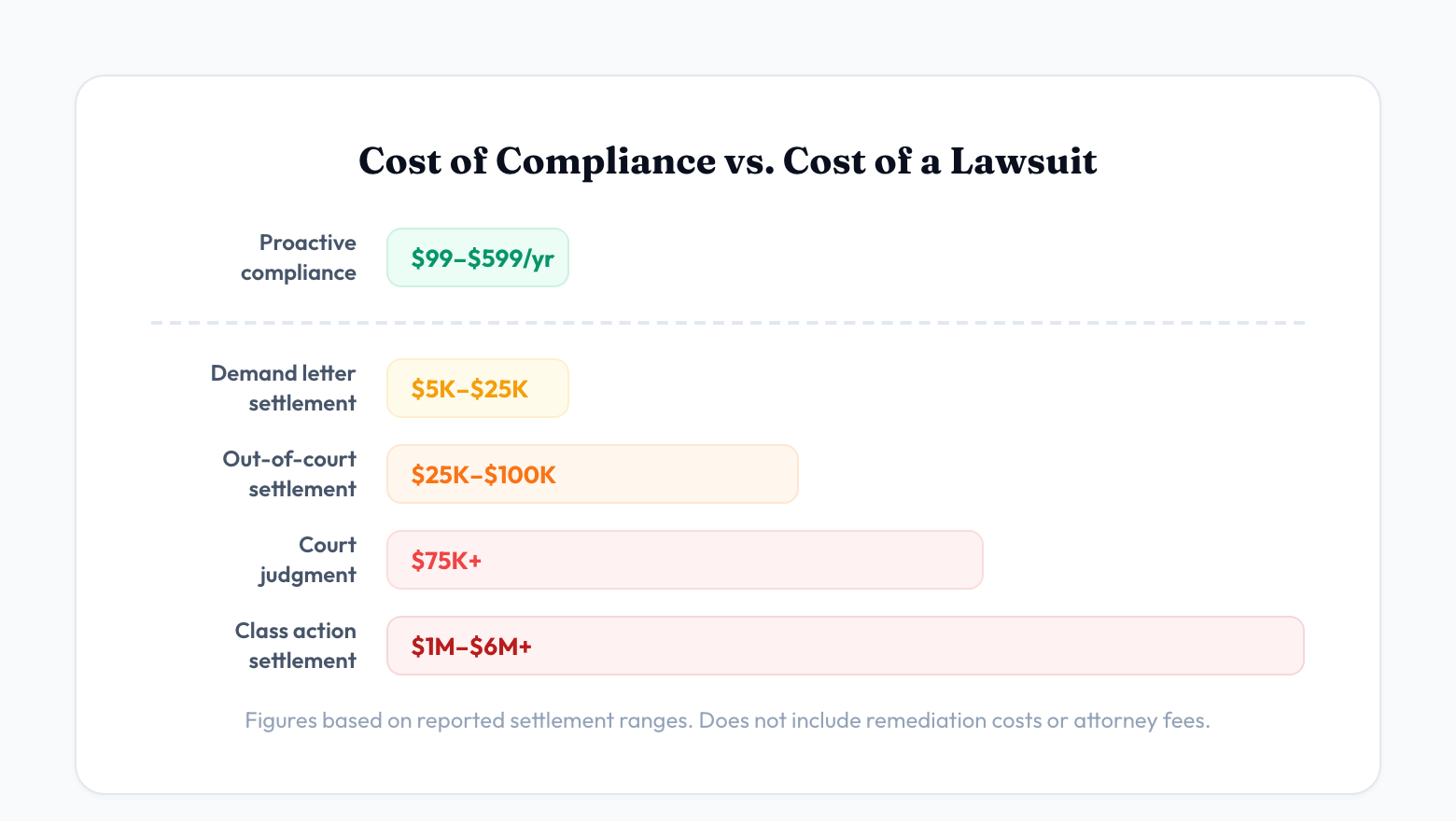
- Demand letter settlements — $5,000 to $25,000. An attorney sends a letter identifying violations and demanding payment. This is the most common scenario and the least expensive to resolve.
- Out-of-court settlements — $25,000 to $100,000+. When a formal complaint is filed and the parties negotiate before trial.
- Court judgments — $75,000+ average. If the case goes to judgment, costs escalate significantly.
- Class action settlements — $1 million to $6 million+. When multiple plaintiffs or advocacy organizations bring claims on behalf of a class.
These figures do not include the cost of remediation itself, ongoing monitoring, attorney fees (yours and theirs), or the staff time consumed by an extended legal process. For a school district or small town, even a $25,000 demand letter settlement is a meaningful budget hit — especially when the cost of proactive compliance is a fraction of that.
Beyond the money: what a complaint really costs
The settlement check is often the smallest part. A DOJ or OCR investigation typically requires:
- A comprehensive accessibility audit of your entire website, often conducted by a third-party firm at your expense.
- Full remediation of all identified issues, with documented evidence of fixes.
- Policy development — a formal digital accessibility policy, grievance procedure, and designated ADA coordinator.
- Staff training on creating and maintaining accessible content.
- Ongoing monitoring — typically 2 to 3 years of periodic audits and progress reports submitted to the federal government.
That monitoring period is the part that consumes the most staff time. Your team will be producing compliance reports, tracking remediation progress, and responding to federal inquiries for years. The organizations that handle this most efficiently are the ones that already have monitoring tools in place before the complaint arrives.
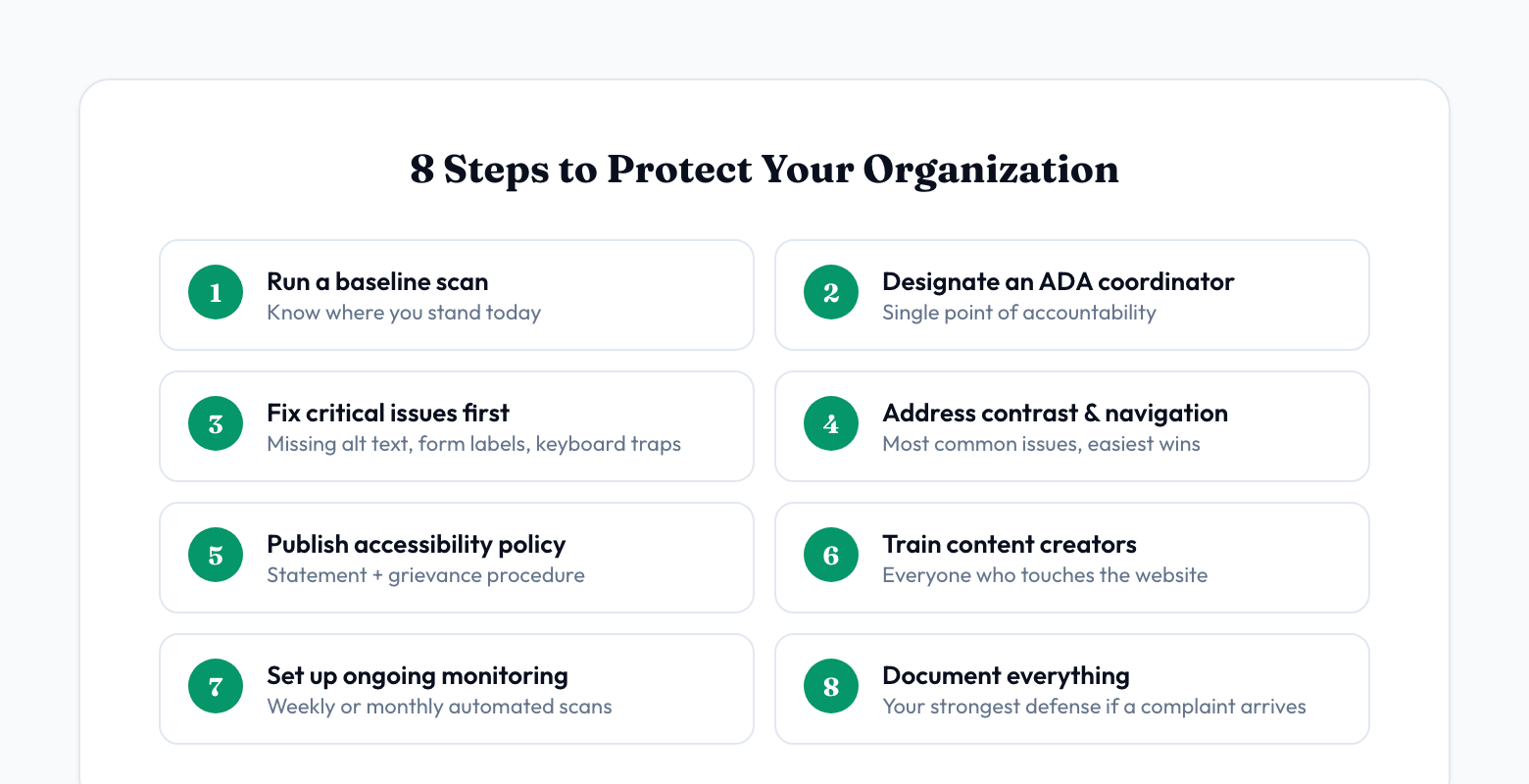
The 8 steps to protect your organization
Compliance is not a one-time project. It is an ongoing process. Here is a practical checklist:
- 1. Run a baseline scan. Before you can fix anything, you need to know where you stand. Use an automated accessibility scanner to crawl your full website and identify every WCAG 2.1 AA violation. This gives you a letter grade, a prioritized issue list, and a starting point for remediation. You can run a free scan with AccessEval to get your baseline in under two minutes.
- 2. Designate an ADA coordinator. The DOJ recommends this as a first step. This person does not need to be a technical expert — they need to be the single point of accountability for your organization's digital accessibility efforts.
- 3. Fix critical issues first. Not all accessibility issues are equal. Start with the ones that completely block access: missing alt text on essential images, forms without labels, keyboard traps, and missing page language declarations. These are the issues most likely to generate complaints.
- 4. Address color contrast and navigation. Low contrast text and confusing navigation are the two most common issues we find on school and government websites. They affect the largest number of users and are straightforward to fix.
- 5. Adopt an accessibility policy. Publish a digital accessibility statement on your website that describes your commitment to accessibility, the standard you are working toward (WCAG 2.1 AA), and how users can report issues. This demonstrates good faith and is required under most settlement agreements.
- 6. Train content creators. Your website is only as accessible as the content people add to it. Make sure everyone who publishes web content — communications staff, teachers uploading documents, department heads updating pages — knows the basics: add alt text to images, use heading structure, write descriptive link text, and check contrast.
- 7. Set up ongoing monitoring. Accessibility is not a one-time fix. New content is added constantly, CMS updates can introduce issues, and third-party widgets change without notice. Automated weekly or monthly scanning catches regressions before they become complaints.
- 8. Document everything. If a complaint does arrive, the strongest defense is documented good faith effort — scan results showing improvement over time, a published accessibility statement, training records, and a remediation plan. The DOJ has consistently treated proactive organizations more favorably than those caught doing nothing.
What “good enough” looks like
No website is 100% WCAG conformant at all times. Content changes daily, third-party tools introduce issues, and some WCAG criteria require manual judgment calls that reasonable people can disagree on. The DOJ recognizes this.
What the DOJ looks for is a systematic, good faith effort to achieve and maintain conformance. That means:
- You have identified your issues (baseline scan).
- You are actively remediating them (documented fixes).
- You are monitoring for new issues (ongoing scanning).
- You have a process for handling accessibility complaints (published policy).
- Your team knows how to create accessible content (training).
An organization with a score of 75/100 and a clear upward trend, documented remediation efforts, and a published accessibility statement is in a fundamentally different legal position than one with a score of 75/100 and no evidence of any effort. The score matters less than the trajectory and the documentation.
The cost of compliance vs. the cost of a lawsuit
Proactive compliance for a typical school district or small municipality costs between $99 and $599 per year for scanning and monitoring tools, plus staff time for remediation. Most organizations can reach a passing grade within 30 to 90 days of focused effort.
A single demand letter settlement starts at $5,000. An OCR resolution agreement consumes hundreds of hours of staff time over 2 to 3 years. A federal lawsuit can cost $75,000 or more before you even consider remediation.
The math is not complicated. The organizations that act before the deadline are spending hundreds of dollars. The ones that wait for a complaint are spending tens of thousands — and doing the same remediation work anyway, just under federal supervision.
What to do right now
If you have not started, start today. The single most valuable thing you can do is run a scan and see where you stand. It takes two minutes, costs nothing, and gives you the information you need to have an informed conversation with your leadership about next steps.
Run a free accessibility scan — no account required. You will get a letter grade, issue count by severity, and a list of your top accessibility violations with plain-English descriptions.
The deadline is coming whether you are ready or not. The only question is whether you address it on your terms or on someone else's.
Check your website’s accessibility
Run a free scan and get a plain-English report of every accessibility issue — no account required.
Run a free scan